 Skin loves Skinolin.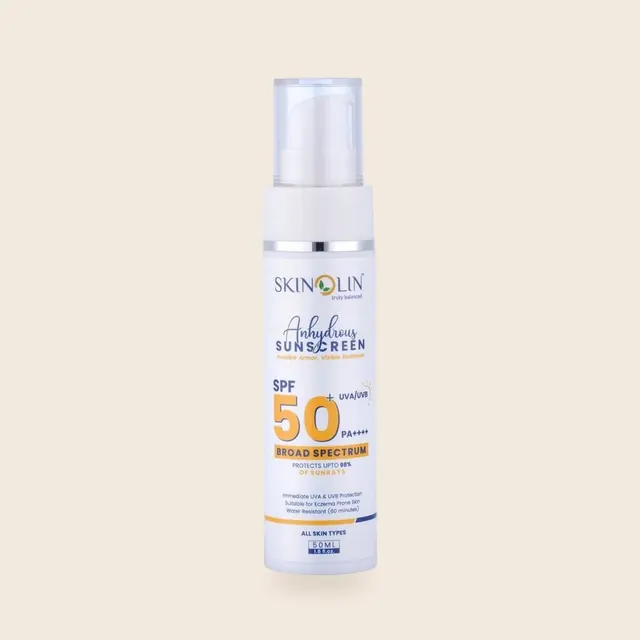
Design preview by LockNCode
What changed and why
This preview shows the Skinolin store with every change from our website experience review built in, on the real catalog, prices and reviews. Tap any link to see the change in place.
| Code | Finding | Where to see it | Status |
|---|---|---|---|
| GL-010 | Clear the floating buttons off Add to Cart High |
Every page: only WhatsApp floats, never over a button | Shown in the preview |
| GL-020 | Show prices one way: ₹1,250 Medium |
Every price, cart and checkout: ₹1,250 | Shown in the preview |
| GL-030 | Use the top bar for a shopper promise Medium |
Top bar on every page | Shown in the preview |
| GL-040 | Replace the moving claim tickers with three facts Medium |
Homepage: still facts strip, no ticker | Shown in the preview |
| GL-050 | Turn the tools already installed into a weekly funnel Medium |
The weekly funnel lives in the LockNCode SEO dashboard (Shopify reports + Clarity) | Outside the site |
| GL-060 | Say who sells, and update the footer Low |
Footer on every page: who sells, © 2026, no developer credit | Shown in the preview |
| GL-070 | Rewrite the refund, shipping and cancellation pages High |
Shipping and returns page, and one line beside every Add to Cart | Shown in the preview (wording to confirm) |
| GL-080 | Show the product details the law asks for Medium |
Product details on every product page | Shown in the preview (details to confirm) |
| GL-090 | Give the error page search and best sellers Low |
Page not found with search, concerns and bestsellers | Shown in the preview |
| GL-100 | Use one spelling and one name for each thing Low |
Whole site: one name per product, Moisturizer, SPF 50 PA++++ | Shown in the preview |
| NAV-010 | Send Shop by concern to concern pages High |
Menu, homepage circles and shop chips: seven concern collections | Shown in the preview |
| NAV-020 | Keep the main menu for shoppers Medium |
Main menu: concerns and product types; affiliate and salon links in the footer | Shown in the preview |
| NAV-030 | Rename Home Care Low |
All products replaces Home Care | Shown in the preview |
| NAV-040 | Put search in the phone header Low |
Search icon in the phone header, with concern shortcuts | Shown in the preview |
| NAV-050 | Test a bar at the bottom of the screen on phones Medium |
Bar at the bottom of the phone screen: Home, Shop, Concerns, Search, Cart | Shown in the preview |
| HP-010 | Replace the three rotating slides with one first screen that sells High |
Homepage: one still first screen, 0% water. 100% sunscreen. | Shown in the preview |
| HP-020 | Show four best sellers with stars and prices in the second screen High |
Homepage: four bestsellers as a grid | Shown in the preview |
| HP-030 | Bring proof up: ratings and verified reviews High |
Homepage: stars on every card and real customer reviews in screen four | Shown in the preview |
| HP-040 | Give the salon range its own page Medium |
For salons and clinics page; a slim link at the end of the homepage | Shown in the preview |
| HP-050 | Move the shoppable videos up Medium |
Homepage: the in-use row sits in screen five; on the live store this is the Quinn shoppable video row | Shown in the preview (stills stand in for the videos) |
| HP-060 | Show categories as a grid Low |
Homepage: six category tiles | Shown in the preview |
| COL-010 | Add star ratings and a "best for" label to product cards Medium |
Shop: stars and a Best for label on every card | Shown in the preview |
| COL-020 | Give cards a short name Low |
Shop: short names in sentence case | Shown in the preview |
| PDP-010 | Remove the invented "people have bought this" and "viewing now" numbers Critical |
No made-up counters anywhere | Shown in the preview |
| PDP-020 | Bring name, rating, price and Add to Cart into the first phone screen High |
Product pages: name, stars and price under the photo; the Add to Cart bar shows from the first phone screen | Shown in the preview |
| PDP-025 | Show the other photos right under the main photo High |
Product pages: photo strip under the main photo, no empty band | Shown in the preview |
| PDP-030 | Rewrite the CICA serum description: one name, claims Skinolin can show High |
CICA serum page: one name, softer claims | Shown in the preview (wording to approve) |
| PDP-040 | Write the three key benefits for each product Medium |
Three benefits per product, written for that product | Shown in the preview (wording to approve) |
| PDP-050 | Show the payment methods the checkout offers, UPI first Medium |
Pay with: UPI, Google Pay, PhonePe, cards, RuPay, net banking | Shown in the preview |
| PDP-060 | Put the delivery promise and returns beside the button High |
Delivery time, free replacement and payment beside every Add to Cart | Shown in the preview (times to confirm) |
| PDP-070 | Ask every buyer for a review High |
Reviews section; the request itself is a Judge.me setting (email + WhatsApp 7 days after delivery) | Setting to switch on |
| PDP-080 | Offer the combo that saves money next to the button Medium |
Save ₹185 with the Skin Repair Combo under the button, with Switch | Shown in the preview |
| PDP-090 | One solid button, one outline Low |
Add to Cart solid, Buy it now as an outline | Shown in the preview |
| PDP-100 | Prove the SPF 50 on the sunscreen page High |
SPF 50 page: sun facts block from the pack | Shown in the preview (test standard and lab to add) |
| PDP-110 | Give the facial kit pages a price or a clear way to buy High |
Kit pages: price plus a salon trade-price button | Shown in the preview |
| CART-010 | Keep the drawer's Checkout button on screen High |
Cart drawer: Checkout full width first, View cart as a link | Shown in the preview |
| CART-020 | Make Checkout the main button on the cart page High |
Cart page: summary and Checkout at the top | Shown in the preview |
| CART-030 | Say free shipping and how to pay in the cart Medium |
Cart and drawer: Shipping Free, payment options under Checkout | Shown in the preview |
| CART-040 | Suggest one product that completes the routine Medium |
Cart: one product that completes the routine | Shown in the preview |
| CART-050 | Test a festive gift above a cart value Medium |
Cart: progress to the Diwali gift above ₹1,499 | Shown in the preview (gift to decide) |
| CK-010 | Test cash on delivery for first orders High |
Checkout: cash on delivery as a test option | Shown in the preview (decision needed) |
| CK-020 | Show free shipping before the address Low |
Checkout: free delivery banner before the address | Shown in the preview |
| BLOG-010 | Put product cards inside the articles High |
Guides: product cards in the article and a Shop this routine bar | Shown in the preview |
| BLOG-020 | Name the expert behind each article Medium |
Guides: Reviewed by line under the title | Shown in the preview (name to confirm) |
| BLOG-030 | Sharpen the titles Google shows but few click Medium |
New titles and descriptions for the five most-seen articles: SEO work, not a page change | Part of the SEO plan |
Still to confirm before this goes live
- The three lines (Skin loves Skinolin. / India's botanical balance. / 0% water. 100% sunscreen.) go through the claims review first.
- SPF 50: name the SPF and PA test standard (ISO 24444 and ISO 24443) and the lab, from the test report.
- Delivery times, the damaged-item replacement promise and the policy wording are proposals for Skinolin to confirm.
- Product details block: confirm Marketed by (Sinatra Enterprises), Manufactured by (JP Healthcare, Parwanoo) and the customer care contact.
- Reviews: none on the live store is marked as a verified buyer, and two SPF 50 reviews carry the same text under two names (Aanchal, Ranjeeta Singh). This preview shows each text once.
- The live Daily Essential Duo page says cleanser + moisturizer in one place and cleanser + toner in another; the price matches cleanser + toner, which this preview uses.
- Some live product text shows broken characters (� marks); the preview cleans them, the store needs the same fix.
- Diwali gift above ₹1,499 and the cash on delivery test are decisions for Skinolin.
Product photos are the brand's own; scene images were made by placing the real product photos into new backgrounds, so every label is exactly as printed. Prices, ratings and reviews come from the live store on 22 October 2026. Nothing in this preview takes orders or payments.